【Unity】【URP】URPにおけるディファードレンダリング
ディファードレンダリングについての解説とURPではどのように実装さているのか見ていきたいと思います。 フォワードレンダリングの実装についてはこちらで解説しているので、よろしければご覧ください。
ディファードレンダリングとは?
ディファードレンダリングとは、ライティングに必要な情報(位置、法線、スペキュラなど)をGbufferという画像に書き込みを行います(ジオメトリパス)。その後、ピクセル単位でGbufferの情報を使った、ライティング処理を行います(ライティングパス)。
この手法により、深度テストに合格したフラグメントのみライティングの計算を行うため、余計な計算を省略することができます。
メリット
光源を多く使用できる
オブジェクトごとにライティング計算を行い描画するフォワードシェーディングとは異なり、ディファードレンダリングではライティングパスで一度しか行われないので、光源を沢山配置することができます。
ただし広範囲に影響を与えるライトが多数存在するほど処理負荷は大きくなるので注意が必要です。
ポストエフェクトと相性が良い
ジオメトリパスで、作成したG-Bufferの情報をポストエフェクトで使用することができます。
デメリット
半透明が描けない
ジオメトリパスでジオメトリ情報を二次元のテクスチャに描き込んでしまうことにより、後ろに隠れたオブジェクトの情報が消えてしまうので、半透明が描けなくなります。
もし必要な場合は半透明の描画のみフォワードレンダリングを使用します。
MSAAが使えない
GBufferを全てMSAA用にする必要があるため、費用対効果が悪いです。
制約
G-Bufferを確保するため一定のメモリを必要とします。 そのため、モバイル端末では不利です。
最小シェーダー モデル: シェーダー モデル 4.5。
Deferred Rendering Path は、OpenGL ベースのグラフィックス API (デスクトップ OpenGL、OpenGL ES 2.0、OpenGL ES 3.0、WebGL 1.0、WebGL 2.0) をサポートしていません。
URPでディファードレンダリングを使用する
Universal Renderer DataのRendering PathをDeferredに変更するとディファードレンダリングに切り替わります。

URPでの処理
ジオメトリパス
こちらはLit.ShaderにあるGbufferを出力するパスです。
Pass
        {
            // Lightmode matches the ShaderPassName set in UniversalRenderPipeline.cs. SRPDefaultUnlit and passes with
            // no LightMode tag are also rendered by Universal Render Pipeline
            Name "GBuffer"
            Tags{"LightMode" = "UniversalGBuffer"}

            ZWrite[_ZWrite]
            ZTest LEqual
            Cull[_Cull]

            HLSLPROGRAM
            #pragma exclude_renderers gles gles3 glcore
            #pragma target 4.5

            // -------------------------------------
            // Material Keywords
            #pragma shader_feature_local _NORMALMAP
            #pragma shader_feature_local_fragment _ALPHATEST_ON
            //#pragma shader_feature_local_fragment _ALPHAPREMULTIPLY_ON
            #pragma shader_feature_local_fragment _EMISSION
            #pragma shader_feature_local_fragment _METALLICSPECGLOSSMAP
            #pragma shader_feature_local_fragment _SMOOTHNESS_TEXTURE_ALBEDO_CHANNEL_A
            #pragma shader_feature_local_fragment _OCCLUSIONMAP
            #pragma shader_feature_local _PARALLAXMAP
            #pragma shader_feature_local _ _DETAIL_MULX2 _DETAIL_SCALED

            #pragma shader_feature_local_fragment _SPECULARHIGHLIGHTS_OFF
            #pragma shader_feature_local_fragment _ENVIRONMENTREFLECTIONS_OFF
            #pragma shader_feature_local_fragment _SPECULAR_SETUP
            #pragma shader_feature_local _RECEIVE_SHADOWS_OFF

            // -------------------------------------
            // Universal Pipeline keywords
            #pragma multi_compile _ _MAIN_LIGHT_SHADOWS _MAIN_LIGHT_SHADOWS_CASCADE _MAIN_LIGHT_SHADOWS_SCREEN
            //#pragma multi_compile _ _ADDITIONAL_LIGHTS_VERTEX _ADDITIONAL_LIGHTS
            //#pragma multi_compile _ _ADDITIONAL_LIGHT_SHADOWS
            #pragma multi_compile_fragment _ _REFLECTION_PROBE_BLENDING
            #pragma multi_compile_fragment _ _REFLECTION_PROBE_BOX_PROJECTION
            #pragma multi_compile_fragment _ _SHADOWS_SOFT
            #pragma multi_compile_fragment _ _DBUFFER_MRT1 _DBUFFER_MRT2 _DBUFFER_MRT3
            #pragma multi_compile_fragment _ _LIGHT_LAYERS
            #pragma multi_compile_fragment _ _RENDER_PASS_ENABLED

            // -------------------------------------
            // Unity defined keywords
            #pragma multi_compile _ LIGHTMAP_SHADOW_MIXING
            #pragma multi_compile _ SHADOWS_SHADOWMASK
            #pragma multi_compile _ DIRLIGHTMAP_COMBINED
            #pragma multi_compile _ LIGHTMAP_ON
            #pragma multi_compile _ DYNAMICLIGHTMAP_ON
            #pragma multi_compile_fragment _ _GBUFFER_NORMALS_OCT

            //--------------------------------------
            // GPU Instancing
            #pragma multi_compile_instancing
            #pragma instancing_options renderinglayer
            #pragma multi_compile _ DOTS_INSTANCING_ON

            #pragma vertex LitGBufferPassVertex
            #pragma fragment LitGBufferPassFragment

            #include "Packages/com.unity.render-pipelines.universal/Shaders/LitInput.hlsl"
            #include "Packages/com.unity.render-pipelines.universal/Shaders/LitGBufferPass.hlsl"
            ENDHLSL
        }
頂点シェーダーとフラグメントシェーダーはLitGBufferPass.hlslに記述されているようです。
#pragma vertex LitGBufferPassVertex
#pragma fragment LitGBufferPassFragment

#include "Packages/com.unity.render-pipelines.universal/Shaders/LitInput.hlsl"
#include "Packages/com.unity.render-pipelines.universal/Shaders/LitGBufferPass.hlsl"
LitGBufferPass.hlslの内容です。
#ifndef UNIVERSAL_LIT_GBUFFER_PASS_INCLUDED
#define UNIVERSAL_LIT_GBUFFER_PASS_INCLUDED

#include "Packages/com.unity.render-pipelines.universal/ShaderLibrary/Lighting.hlsl"
#include "Packages/com.unity.render-pipelines.universal/ShaderLibrary/UnityGBuffer.hlsl"

#if defined(_PARALLAXMAP) && (SHADER_TARGET >= 30)
#define REQUIRES_TANGENT_SPACE_VIEW_DIR_INTERPOLATOR
#endif

#if (defined(_NORMALMAP) || (defined(_PARALLAXMAP) && !defined(REQUIRES_TANGENT_SPACE_VIEW_DIR_INTERPOLATOR))) || defined(_DETAIL)
#define REQUIRES_WORLD_SPACE_TANGENT_INTERPOLATOR
#endif

struct Attributes
{
    float4 positionOS   : POSITION;
    float3 normalOS     : NORMAL;
    float4 tangentOS    : TANGENT;
    float2 texcoord     : TEXCOORD0;
    float2 staticLightmapUV   : TEXCOORD1;
    float2 dynamicLightmapUV  : TEXCOORD2;
    UNITY_VERTEX_INPUT_INSTANCE_ID
};

struct Varyings
{
    float2 uv                       : TEXCOORD0;

#if defined(REQUIRES_WORLD_SPACE_POS_INTERPOLATOR)
    float3 positionWS               : TEXCOORD1;
#endif

    half3 normalWS                  : TEXCOORD2;
#if defined(REQUIRES_WORLD_SPACE_TANGENT_INTERPOLATOR)
    half4 tangentWS                 : TEXCOORD3;    // xyz: tangent, w: sign
#endif
#ifdef _ADDITIONAL_LIGHTS_VERTEX
    half3 vertexLighting            : TEXCOORD4;    // xyz: vertex lighting
#endif

#if defined(REQUIRES_VERTEX_SHADOW_COORD_INTERPOLATOR)
    float4 shadowCoord              : TEXCOORD5;
#endif

#if defined(REQUIRES_TANGENT_SPACE_VIEW_DIR_INTERPOLATOR)
    half3 viewDirTS                 : TEXCOORD6;
#endif

    DECLARE_LIGHTMAP_OR_SH(staticLightmapUV, vertexSH, 7);
#ifdef DYNAMICLIGHTMAP_ON
    float2  dynamicLightmapUV       : TEXCOORD8; // Dynamic lightmap UVs
#endif

    float4 positionCS               : SV_POSITION;
    UNITY_VERTEX_INPUT_INSTANCE_ID
    UNITY_VERTEX_OUTPUT_STEREO
};

void InitializeInputData(Varyings input, half3 normalTS, out InputData inputData)
{
    inputData = (InputData)0;

    #if defined(REQUIRES_WORLD_SPACE_POS_INTERPOLATOR)
        inputData.positionWS = input.positionWS;
    #endif

    inputData.positionCS = input.positionCS;
    half3 viewDirWS = GetWorldSpaceNormalizeViewDir(input.positionWS);
    #if defined(_NORMALMAP) || defined(_DETAIL)
        float sgn = input.tangentWS.w;      // should be either +1 or -1
        float3 bitangent = sgn * cross(input.normalWS.xyz, input.tangentWS.xyz);
        inputData.normalWS = TransformTangentToWorld(normalTS, half3x3(input.tangentWS.xyz, bitangent.xyz, input.normalWS.xyz));
    #else
        inputData.normalWS = input.normalWS;
    #endif

    inputData.normalWS = NormalizeNormalPerPixel(inputData.normalWS);
    inputData.viewDirectionWS = viewDirWS;

    #if defined(REQUIRES_VERTEX_SHADOW_COORD_INTERPOLATOR)
        inputData.shadowCoord = input.shadowCoord;
    #elif defined(MAIN_LIGHT_CALCULATE_SHADOWS)
        inputData.shadowCoord = TransformWorldToShadowCoord(inputData.positionWS);
    #else
        inputData.shadowCoord = float4(0, 0, 0, 0);
    #endif

    inputData.fogCoord = 0.0; // we don't apply fog in the guffer pass

    #ifdef _ADDITIONAL_LIGHTS_VERTEX
        inputData.vertexLighting = input.vertexLighting.xyz;
    #else
        inputData.vertexLighting = half3(0, 0, 0);
    #endif

#if defined(DYNAMICLIGHTMAP_ON)
    inputData.bakedGI = SAMPLE_GI(input.staticLightmapUV, input.dynamicLightmapUV, input.vertexSH, inputData.normalWS);
#else
    inputData.bakedGI = SAMPLE_GI(input.staticLightmapUV, input.vertexSH, inputData.normalWS);
#endif

    inputData.normalizedScreenSpaceUV = GetNormalizedScreenSpaceUV(input.positionCS);
    inputData.shadowMask = SAMPLE_SHADOWMASK(input.staticLightmapUV);
}

Varyings LitGBufferPassVertex(Attributes input)
{
    Varyings output = (Varyings)0;

    UNITY_SETUP_INSTANCE_ID(input);
    UNITY_TRANSFER_INSTANCE_ID(input, output);
    UNITY_INITIALIZE_VERTEX_OUTPUT_STEREO(output);

    VertexPositionInputs vertexInput = GetVertexPositionInputs(input.positionOS.xyz);

    VertexNormalInputs normalInput = GetVertexNormalInputs(input.normalOS, input.tangentOS);

    output.uv = TRANSFORM_TEX(input.texcoord, _BaseMap);

    output.normalWS = normalInput.normalWS;

    #if defined(REQUIRES_WORLD_SPACE_TANGENT_INTERPOLATOR) || defined(REQUIRES_TANGENT_SPACE_VIEW_DIR_INTERPOLATOR)
        real sign = input.tangentOS.w * GetOddNegativeScale();
        half4 tangentWS = half4(normalInput.tangentWS.xyz, sign);
    #endif

    #if defined(REQUIRES_WORLD_SPACE_TANGENT_INTERPOLATOR)
        output.tangentWS = tangentWS;
    #endif

    #if defined(REQUIRES_TANGENT_SPACE_VIEW_DIR_INTERPOLATOR)
        half3 viewDirWS = GetWorldSpaceNormalizeViewDir(vertexInput.positionWS);
        half3 viewDirTS = GetViewDirectionTangentSpace(tangentWS, output.normalWS, viewDirWS);
        output.viewDirTS = viewDirTS;
    #endif

    OUTPUT_LIGHTMAP_UV(input.staticLightmapUV, unity_LightmapST, output.staticLightmapUV);
#ifdef DYNAMICLIGHTMAP_ON
    output.dynamicLightmapUV = input.dynamicLightmapUV.xy * unity_DynamicLightmapST.xy + unity_DynamicLightmapST.zw;
#endif
    OUTPUT_SH(output.normalWS.xyz, output.vertexSH);

    #ifdef _ADDITIONAL_LIGHTS_VERTEX
        half3 vertexLight = VertexLighting(vertexInput.positionWS, normalInput.normalWS);
        output.vertexLighting = vertexLight;
    #endif

    #if defined(REQUIRES_WORLD_SPACE_POS_INTERPOLATOR)
        output.positionWS = vertexInput.positionWS;
    #endif

    #if defined(REQUIRES_VERTEX_SHADOW_COORD_INTERPOLATOR)
        output.shadowCoord = GetShadowCoord(vertexInput);
    #endif

    output.positionCS = vertexInput.positionCS;

    return output;
}

FragmentOutput LitGBufferPassFragment(Varyings input)
{
    UNITY_SETUP_INSTANCE_ID(input);
    UNITY_SETUP_STEREO_EYE_INDEX_POST_VERTEX(input);

#if defined(_PARALLAXMAP)
#if defined(REQUIRES_TANGENT_SPACE_VIEW_DIR_INTERPOLATOR)
    half3 viewDirTS = input.viewDirTS;
#else
    half3 viewDirTS = GetViewDirectionTangentSpace(input.tangentWS, input.normalWS, input.viewDirWS);
#endif
    ApplyPerPixelDisplacement(viewDirTS, input.uv);
#endif

    SurfaceData surfaceData;
    InitializeStandardLitSurfaceData(input.uv, surfaceData);

    InputData inputData;
    InitializeInputData(input, surfaceData.normalTS, inputData);
    SETUP_DEBUG_TEXTURE_DATA(inputData, input.uv, _BaseMap);

#ifdef _DBUFFER
    ApplyDecalToSurfaceData(input.positionCS, surfaceData, inputData);
#endif

    // Stripped down version of UniversalFragmentPBR().

    // in LitForwardPass GlobalIllumination (and temporarily LightingPhysicallyBased) are called inside UniversalFragmentPBR
    // in Deferred rendering we store the sum of these values (and of emission as well) in the GBuffer
    BRDFData brdfData;
    InitializeBRDFData(surfaceData.albedo, surfaceData.metallic, surfaceData.specular, surfaceData.smoothness, surfaceData.alpha, brdfData);

    Light mainLight = GetMainLight(inputData.shadowCoord, inputData.positionWS, inputData.shadowMask);
    MixRealtimeAndBakedGI(mainLight, inputData.normalWS, inputData.bakedGI, inputData.shadowMask);
    half3 color = GlobalIllumination(brdfData, inputData.bakedGI, surfaceData.occlusion, inputData.positionWS, inputData.normalWS, inputData.viewDirectionWS);

    return BRDFDataToGbuffer(brdfData, inputData, surfaceData.smoothness, surfaceData.emission + color, surfaceData.occlusion);
}

#endif
フラグメントシェーダーの戻り値が構造体になっており、BRDFDataToGbufferでFragmentOutput構造体に データを入れて、出力しています。 GBufferパスでは一度のドローコールで、GBufferの情報を全て出力します。
FragmentOutput LitGBufferPassFragment(Varyings input)
{
 ・
 ・
    ・
  return BRDFDataToGbuffer(brdfData, inputData, surfaceData.smoothness, surfaceData.emission + color, surfaceData.occlusion);
}
構造体の中身はUnityGBuffer.hlslに定義されています。
struct FragmentOutput
{
    half4 GBuffer0 : SV_Target0;
    half4 GBuffer1 : SV_Target1;
    half4 GBuffer2 : SV_Target2;
    half4 GBuffer3 : SV_Target3; // Camera color attachment
    #if OUTPUT_SHADOWMASK
    half4 GBuffer4 : SV_Target4;
    #endif
};
FragmentOutput構造体にどのようなデータを格納しているか、BRDFDataToGbufferを確認していきます。
FragmentOutput BRDFDataToGbuffer(BRDFData brdfData, InputData inputData, half smoothness, half3 globalIllumination, half occlusion = 1.0)
{
    half3 packedNormalWS = PackNormal(inputData.normalWS);
    half packedSmoothness = PackSmoothness(smoothness, kLightingLit);

    uint materialFlags = 0;

    #ifdef _RECEIVE_SHADOWS_OFF
    materialFlags |= kMaterialFlagReceiveShadowsOff;
    #endif

    half3 packedSpecular;

    #ifdef _SPECULAR_SETUP
    materialFlags |= kMaterialFlagSpecularSetup;
    packedSpecular = brdfData.specular.rgb;
    #else
    packedSpecular.r = brdfData.reflectivity;
    packedSpecular.gb = 0.0;
    #endif

    #ifdef _SPECULARHIGHLIGHTS_OFF
    materialFlags |= kMaterialFlagSpecularHighlightsOff;
    packedSpecular = 0.0.xxx;
    #endif

    #if defined(LIGHTMAP_ON) && defined(_MIXED_LIGHTING_SUBTRACTIVE)
    materialFlags |= kMaterialFlagSubtractiveMixedLighting;
    #endif

    FragmentOutput output;
    output.GBuffer0 = half4(brdfData.albedo.rgb, PackMaterialFlags(materialFlags));  // diffuse           diffuse         diffuse         materialFlags   (sRGB rendertarget)
    output.GBuffer1 = half4(packedSpecular, occlusion);                              // metallic/specular specular        specular        occlusion
    output.GBuffer2 = half4(packedNormalWS, packedSmoothness);                       // encoded-normal    encoded-normal  encoded-normal  smoothness
    output.GBuffer3 = half4(globalIllumination, 1);                                  // GI                GI              GI              [optional: see OutputAlpha()] (lighting buffer)
    #if OUTPUT_SHADOWMASK
    output.GBuffer4 = inputData.shadowMask; // will have unity_ProbesOcclusion value if subtractive lighting is used (baked)
    #endif

    return output;
}
GBufferの構成です。 Albedo / Specular / Normal / GI が RGB チャンネルに、マテリアルのフラグ / Occlusion / Smoothness がアルファチャネルに書き込まれています。
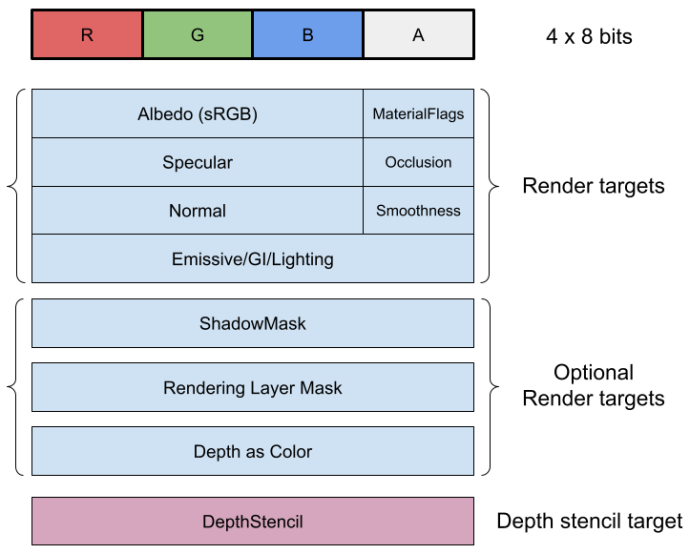
GBuffer0
Albedoとマテリアルのフラグが渡されます。
output.GBuffer0 = half4(brdfData.albedo.rgb, PackMaterialFlags(materialFlags));
マテリアルフラグは4つの描画オプションをビットで保存します。
#define kMaterialFlagReceiveShadowsOff        1 // Does not receive dynamic shadows
#define kMaterialFlagSpecularHighlightsOff    2 // Does not receivce specular
#define kMaterialFlagSubtractiveMixedLighting 4 // The geometry uses subtractive mixed lighting
#define kMaterialFlagSpecularSetup            8 // Lit material use specular setup instead of metallic setup


float PackMaterialFlags(uint materialFlags)
{
    return materialFlags * (1.0h / 255.0h);
}
ビット 1 : ビットのフラグが立っている時、ピクセルは動的シャドウを受け取りません。
ビット 2 :ビットのフラグが立っている時、ピクセルはスペキュラーハイライトを受け取りません。
ビット 4 : 設定されている場合、ピクセルは減算混合照明を使用します。
ビット 8 : 設定されている場合、マテリアルはスペキュラーワークフローを使用します。
GBuffer1
SpecularとOcclusionが渡されます。
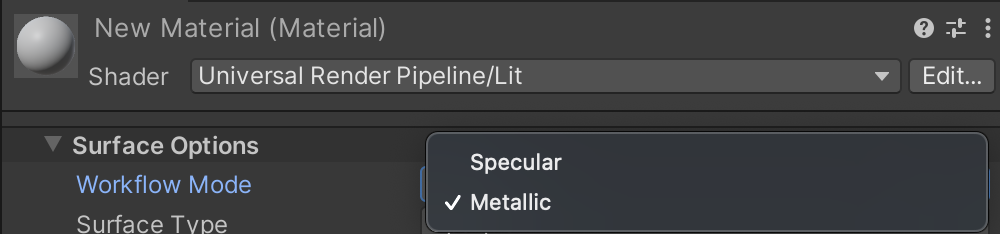
Specularはマテリアルのワークフローモードで、MetallicかSpecularを選択できるのですが、それぞれでGBuggerの扱いが異なります。
SpecularワークフローにはRGBチャンネル全て使用され、MetallicワークフローのRチャンネルのみ使用され、GBチャンネルは使用されません。
Occlusionはベイクされたオクルージョン値と SSAO 値を組み合わせてアンビエントオクルージョン値を出力します。
    #ifdef _SPECULAR_SETUP
    materialFlags |= kMaterialFlagSpecularSetup;
    packedSpecular = brdfData.specular.rgb;
    #else
    packedSpecular.r = brdfData.reflectivity;
    packedSpecular.gb = 0.0;
    #endif
・
・
・
output.GBuffer1 = half4(packedSpecular, occlusion);
GBuffer2
Normalにはワールド座標系の法線、SmoothnessにはLitシェーダーに設定した数値を出力します。
half3 packedNormalWS = PackNormal(inputData.normalWS);
half packedSmoothness = PackSmoothness(smoothness, kLightingLit);
・
・
・
output.GBuffer2 = half4(packedNormalWS, packedSmoothness);
それぞれPackNormalとPackSmoothnessを経由して、GBufferに格納されています。 それぞれの定義を見てみましょう。
#ifdef _GBUFFER_NORMALS_OCT
half3 PackNormal(half3 n)
{
    float2 octNormalWS = PackNormalOctQuadEncode(n);                  // values between [-1, +1], must use fp32 on some platforms.
    float2 remappedOctNormalWS = saturate(octNormalWS * 0.5 + 0.5);   // values between [ 0, +1]
    return PackFloat2To888(remappedOctNormalWS);                      // values between [ 0, +1]
}


half PackSmoothness(half s, int lightingMode)
{
    if (lightingMode == kLightingSimpleLit)                           // See SimpleLitInput.hlsl, SampleSpecularSmoothness().
        return 0.1h * log2(s) - 0.1h;                                 // values between [ 0, +1]
    else
        return s;                                                     // values between [ 0, +1]
}

#else
half3 PackNormal(half3 n)
{ return n; }                                                         // values between [-1, +1]

half PackSmoothness(half s, int lightingMode)
{
    if (lightingMode == kLightingSimpleLit)                           // See SimpleLitInput.hlsl, SampleSpecularSmoothness().
        return 0.1h * log2(s) - 0.1h;                                 // Normally values between [-1, +1] but need [0; +1] to make terrain blending works
    else
        return s;                                                     // Normally values between [-1, +1] but need [0; +1] to make terrain blending works
}
#endif
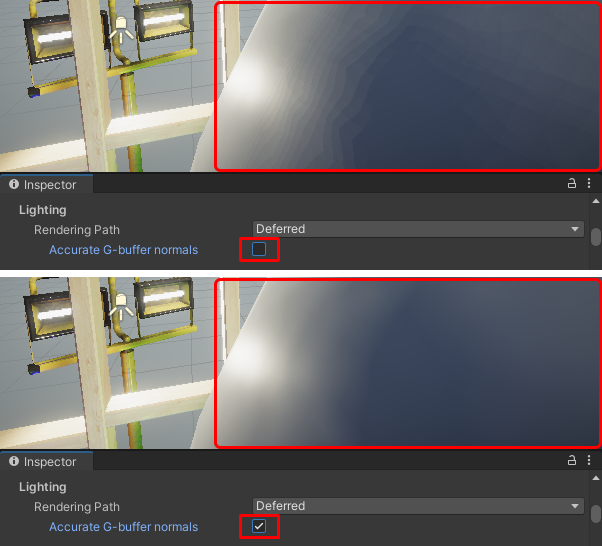
#ifdef GBUFFER_NORMALS_OCTにより、同名関数が分岐されています。 GBUFFER_NORMALS_OCTが定義されている時は、八面体に射影したfloat2にパックしたものをhalf3に変換し、ライティング時に逆変換することで精度を向上させます。負荷が高いため、モバイルでの使用しませんが、この機能を使用しないと滑らかな表面でカラーバンディングアーティファクトが発生する可能性があります。
GBuffer3
GBuffer3 にはEmissiveとベイクされたライティング情報を出力します。
Gbufferに格納されている値は引数から渡された値をそのまま使用しています。
FragmentOutput BRDFDataToGbuffer(BRDFData brdfData, InputData inputData, half smoothness, half3 globalIllumination, half occlusion = 1.0)
{
・
・
・
output.GBuffer3 = half4(globalIllumination, 1);
BRDFDataToGbufferを呼び出している部分です。 surfaceData.emission + colorが該当の引数で、emissionにGlobalIlluminationの戻り値を加算して渡しています。
half3 color = GlobalIllumination(brdfData, inputData.bakedGI, surfaceData.occlusion, inputData.positionWS, inputData.normalWS, inputData.viewDirectionWS);

return BRDFDataToGbuffer(brdfData, inputData, surfaceData.smoothness, surfaceData.emission + color, surfaceData.occlusion);
GBuffer4
Lighting Mode が Subtractive または Shadow mask に設定されている場合にOUTPUT_SHADOWMASKが定義され、GBufferにShadowMaskが格納されます。
#if OUTPUT_SHADOWMASK
output.GBuffer4 = inputData.shadowMask;
#endif
(ShadowMaskとは動的な影と静的な影を混ぜるための機能です)
ライティングパス
お次はGBufferを使用して、実際にレンダリングを行うパスです。 StencilDeferred.shaderに定義されているフラグメントシェーダーを見てみます。 (頂点シェーダーは単純な座標変換のみなのでスキップします)
half4 DeferredShading(Varyings input) : SV_Target
{
    UNITY_SETUP_INSTANCE_ID(input);
    UNITY_SETUP_STEREO_EYE_INDEX_POST_VERTEX(input);
    float2 screen_uv = (input.screenUV.xy / input.screenUV.z);
    #if _RENDER_PASS_ENABLED
    float d        = LOAD_FRAMEBUFFER_INPUT(GBUFFER3, input.positionCS.xy).x;
    half4 gbuffer0 = LOAD_FRAMEBUFFER_INPUT(GBUFFER0, input.positionCS.xy);
    half4 gbuffer1 = LOAD_FRAMEBUFFER_INPUT(GBUFFER1, input.positionCS.xy);
    half4 gbuffer2 = LOAD_FRAMEBUFFER_INPUT(GBUFFER2, input.positionCS.xy);
    #else
    float d        = SAMPLE_TEXTURE2D_X_LOD(_CameraDepthTexture, my_point_clamp_sampler, screen_uv, 0).x; // raw depth value has UNITY_REVERSED_Z applied on most platforms.
    half4 gbuffer0 = SAMPLE_TEXTURE2D_X_LOD(_GBuffer0, my_point_clamp_sampler, screen_uv, 0);
    half4 gbuffer1 = SAMPLE_TEXTURE2D_X_LOD(_GBuffer1, my_point_clamp_sampler, screen_uv, 0);
    half4 gbuffer2 = SAMPLE_TEXTURE2D_X_LOD(_GBuffer2, my_point_clamp_sampler, screen_uv, 0);
    #endif
    #if defined(_DEFERRED_MIXED_LIGHTING)
    half4 shadowMask = SAMPLE_TEXTURE2D_X_LOD(MERGE_NAME(_, GBUFFER_SHADOWMASK), my_point_clamp_sampler, screen_uv, 0);
    #else
    half4 shadowMask = 1.0;
    #endif
    #ifdef _LIGHT_LAYERS
    float4 renderingLayers = SAMPLE_TEXTURE2D_X_LOD(MERGE_NAME(_, GBUFFER_LIGHT_LAYERS), my_point_clamp_sampler, screen_uv, 0);
    uint meshRenderingLayers = uint(renderingLayers.r * 255.5);
    #else
    uint meshRenderingLayers = DEFAULT_LIGHT_LAYERS;
    #endif
    half surfaceDataOcclusion = gbuffer1.a;
    uint materialFlags = UnpackMaterialFlags(gbuffer0.a);
    half3 color = 0.0.xxx;
    half alpha = 1.0;
    #if defined(_DEFERRED_MIXED_LIGHTING)
    [branch] if ((_LightFlags & materialFlags) == kMaterialFlagSubtractiveMixedLighting)
        return half4(color, alpha);
    #endif
    #if defined(USING_STEREO_MATRICES)
    int eyeIndex = unity_StereoEyeIndex;
    #else
    int eyeIndex = 0;
    #endif
    float4 posWS = mul(_ScreenToWorld[eyeIndex], float4(input.positionCS.xy, d, 1.0));
    posWS.xyz *= rcp(posWS.w);
    Light unityLight = GetStencilLight(posWS.xyz, screen_uv, shadowMask, materialFlags);
    [branch] if (!IsMatchingLightLayer(unityLight.layerMask, meshRenderingLayers))
        return half4(color, alpha);
    #if defined(_SCREEN_SPACE_OCCLUSION) && !defined(_SURFACE_TYPE_TRANSPARENT)
        AmbientOcclusionFactor aoFactor = GetScreenSpaceAmbientOcclusion(screen_uv);
        unityLight.color *= aoFactor.directAmbientOcclusion;
        #if defined(_DIRECTIONAL) && defined(_DEFERRED_FIRST_LIGHT)
        half occlusion = aoFactor.indirectAmbientOcclusion < surfaceDataOcclusion ? aoFactor.indirectAmbientOcclusion * rcp(surfaceDataOcclusion) : 1.0;
        alpha = occlusion;
        #endif
    #endif
    InputData inputData = InputDataFromGbufferAndWorldPosition(gbuffer2, posWS.xyz);
    #if defined(_LIT)
        #if SHADER_API_MOBILE || SHADER_API_SWITCH
        bool materialSpecularHighlightsOff = false;
        #else
        bool materialSpecularHighlightsOff = (materialFlags & kMaterialFlagSpecularHighlightsOff);
        #endif
        BRDFData brdfData = BRDFDataFromGbuffer(gbuffer0, gbuffer1, gbuffer2);
        color = LightingPhysicallyBased(brdfData, unityLight, inputData.normalWS, inputData.viewDirectionWS, materialSpecularHighlightsOff);
    #elif defined(_SIMPLELIT)
        SurfaceData surfaceData = SurfaceDataFromGbuffer(gbuffer0, gbuffer1, gbuffer2, kLightingSimpleLit);
        half3 attenuatedLightColor = unityLight.color * (unityLight.distanceAttenuation * unityLight.shadowAttenuation);
        half3 diffuseColor = LightingLambert(attenuatedLightColor, unityLight.direction, inputData.normalWS);
        half smoothness = exp2(10 * surfaceData.smoothness + 1);
        half3 specularColor = LightingSpecular(attenuatedLightColor, unityLight.direction, inputData.normalWS, inputData.viewDirectionWS, half4(surfaceData.specular, 1), smoothness);

        color = diffuseColor * surfaceData.albedo + specularColor;
        #endif

        return half4(color, alpha);
}
GBufferをサンプリングして、ライティングに使用しています。 実際のライティング周りについては本筋ではないため、割愛します。
        float2 screen_uv = (input.screenUV.xy / input.screenUV.z);
        #if _RENDER_PASS_ENABLED
        float d        = LOAD_FRAMEBUFFER_INPUT(GBUFFER3, input.positionCS.xy).x;
        half4 gbuffer0 = LOAD_FRAMEBUFFER_INPUT(GBUFFER0, input.positionCS.xy);
        half4 gbuffer1 = LOAD_FRAMEBUFFER_INPUT(GBUFFER1, input.positionCS.xy);
        half4 gbuffer2 = LOAD_FRAMEBUFFER_INPUT(GBUFFER2, input.positionCS.xy);
        #else
        // SAMPLE_TEXTURE2D を使用すると、iOS プラットフォームで LOAD_TEXTURE2D を使用するよりも高速になります (5% 高速なシェーダー)。
        // 考えられる理由: HLSLcc は Load() 操作を float にアップキャストしますが、Sample() では発生しませんか?
        float d        = SAMPLE_TEXTURE2D_X_LOD(_CameraDepthTexture, my_point_clamp_sampler, screen_uv, 0).x; // raw depth value has UNITY_REVERSED_Z applied on most platforms.
        half4 gbuffer0 = SAMPLE_TEXTURE2D_X_LOD(_GBuffer0, my_point_clamp_sampler, screen_uv, 0);
        half4 gbuffer1 = SAMPLE_TEXTURE2D_X_LOD(_GBuffer1, my_point_clamp_sampler, screen_uv, 0);
        half4 gbuffer2 = SAMPLE_TEXTURE2D_X_LOD(_GBuffer2, my_point_clamp_sampler, screen_uv, 0);
        #endif
ライティングパスのシェーダーを使い分けるには?
ライティングパスはスクリーンスペースでGBufferを参照して、ライティングを行います。そのため、フォワードレンダリングのようにオブジェクト単位で描画して、シェーダーを使い分けるようなことはできません。 そこで、GBufferパスでマテリアル毎にステンシルが書き込んでおき、そのステンシルに対応した DeferredPassを実行しています。
